



 Github Stars:
 Last Commit:
  Created: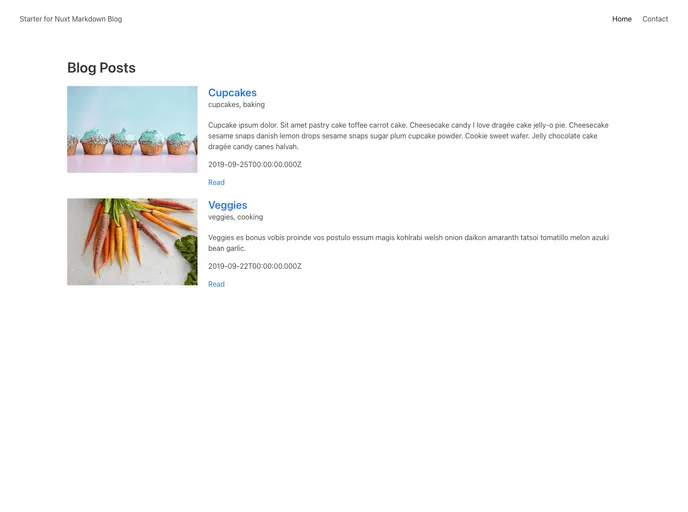
Overview:
The “starter-for-nuxt-markdown-blog” is a ready-to-use template for creating a Nuxt Markdown blog. It provides a convenient starting point for developers who want to quickly set up a blog using the Nuxt.js framework and Markdown syntax for writing content.
Features:
- Nuxt.js Framework: The template is built on top of the Nuxt.js framework, which allows for easy development and deployment of server-rendered applications.
- Markdown Support: The template supports writing blog posts in Markdown syntax, which provides a simple and intuitive way to format and structure content.
- Dynamic Routing: The template automatically generates routes for each blog post based on the file name, making it easy to navigate between different posts.
- SEO-friendly: The template includes meta tags and other SEO optimizations to help improve search engine visibility and ranking for the blog.
- Code Highlighting: It provides out-of-the-box support for syntax highlighting of code snippets in blog posts, enhancing readability for technical content.
- Responsive Design: The template is designed to be fully responsive, ensuring that the blog looks and functions seamlessly on different devices and screen sizes.
Installation:
To install and use the “starter-for-nuxt-markdown-blog” template, follow these steps:
- Clone the repository using the command:
git clone https://github.com/your-username/starter-for-nuxt-markdown-blog.git
- Navigate into the project directory:
cd starter-for-nuxt-markdown-blog
- Install the required dependencies:
npm install
- Start the development server:
npm run dev
- Open your web browser and visit
http://localhost:3000to see the blog in action.
Summary:
The “starter-for-nuxt-markdown-blog” template provides a convenient and efficient way to create a fully functional blog using the Nuxt.js framework and Markdown syntax. With its built-in features and easy-to-use setup process, it offers a great starting point for developers looking to create their own blog or add a blogging feature to their existing website.




















































