



 Github Stars:
 Last Commit:
  Created: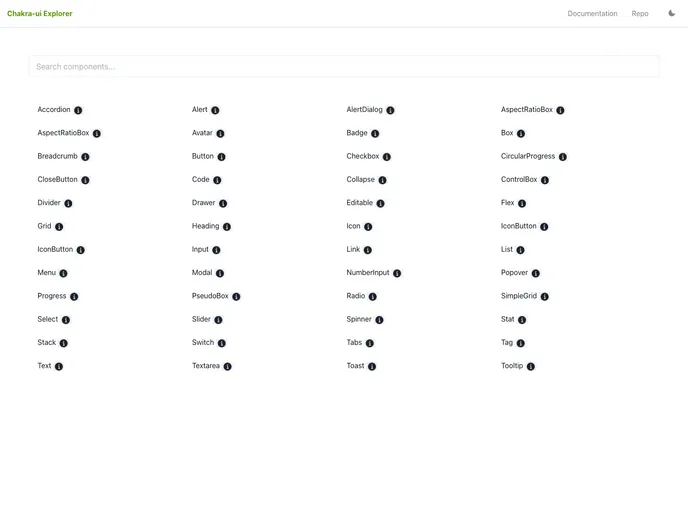
Overview:
The Chakra UI Explorer is a web application that allows users to search for and explore the available Chakra UI components. Chakra UI is a popular open-source design system and component library for React. With the Chakra UI Explorer, users can quickly find the components they need for their projects and get a detailed view of their API and usage examples.
Features:
- Search: Easily search for specific Chakra UI components by name or keyword.
- Component Details: View detailed information about each component, including its props, variants, and usage guidelines.
- API Reference: Access a comprehensive API reference for each component, making it easy to understand how to use them in code.
- Usage Examples: Explore practical usage examples of each component, helping users to quickly understand how to implement them in their own projects.
Installation:
To install the Chakra UI Explorer, follow these steps:
- Clone the Chakra UI Explorer repository from GitHub:
git clone https://github.com/chakra-ui/chakra-ui-explorer.git
- Change to the project directory:
cd chakra-ui-explorer
- Install the necessary dependencies using npm:
npm install
- Start the development server:
npm run dev
- Once the server has started, you can access the Chakra UI Explorer in your browser at
http://localhost:3000.
Summary:
The Chakra UI Explorer is a valuable tool for developers using Chakra UI. It provides an efficient way to search for, explore, and learn about the available components in the library. With its comprehensive API reference and usage examples, the Chakra UI Explorer streamlines the development process and facilitates the implementation of components in projects. Installing the Chakra UI Explorer is straightforward, requiring only a few simple steps. Overall, the Chakra UI Explorer enhances the Chakra UI experience and empowers developers to create beautiful and functional user interfaces with ease.




















































