



 Github Stars:
 Last Commit:
  Created:

Overview
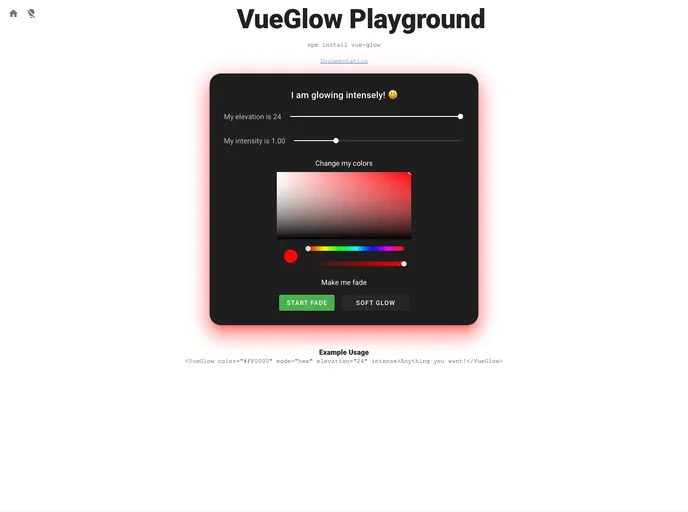
Vue Glow is an exciting Vue component that brings a visually appealing glow and elevation effect to any element of your application. Originally designed to enhance Vuetify designs, it seamlessly integrates into any Vue project, making it a versatile addition to your toolkit. The beauty of Vue Glow lies in its simplicity and the fact that it relies on pure CSS for its effects, eliminating the need for additional libraries or dependencies.
With a variety of customization options, Vue Glow allows developers to tailor their elements’ glow effects to fit their project’s specific needs, whether that be adjusting color, intensity, or even animation speed. This makes it a perfect choice for those looking to enhance the aesthetic appeal of their user interfaces without complicating their codebase.
Features
- Customizable Color: Change the glow color easily using color names, hex codes, or various color formats like RGB, HSL, or HSV, with a default set to “red”.
- Adjustable Elevation: Modify the elevation effect of the glow between 0-24, allowing for greater flexibility in design aesthetics, with a default setting of 12.
- Intensity Control: Personalize the glow’s intensity on a scale from 0 to 4, with a default intensity of 1 to ensure optimum brightness.
- Intense Option: Opt for double the glow intensity with a simple toggle, perfect for drawing attention to important elements.
- Rounded Borders: Define a border radius to create a more stylized appearance, with an initial default of 4px.
- Tile Option: Choose to remove any border radius for those minimalistic designs where a clean look is required.
- Animation Capabilities: Use the fade prop to allow your elements to change hues over time, with adjustable speed to enhance visual effects.
- Disabled State: Easily disable the glow effect, which pauses any associated animations, ensuring control over your UI interactions.


















































